Email Marketing as a Service is a done-for-you add-on. Instead of building and sending campaigns yourself, a dedicated Mailercloud email specialist runs your email programme for you — from setup and quality checks through to scheduling and sending. Think of it as adding an email marketing expert to your team, without the hire.
A dedicated email specialist — one person who learns your campaigns, audience and goals.
End-to-end campaign management — setup, QA, scheduling and sending.
A kickoff call — to align on your brand, audience and what success looks like for you.
Ongoing reviews — as your campaigns run.
A monthly report — what was sent, how it performed (opens and clicks), what we did and what's next.
Save time — hand off the day-to-day of building and sending campaigns.
Expert execution — campaigns are set up and checked by people who do this every day.
Better deliverability — your specialist follows sending best practices so your mail reaches the inbox.
A single point of contact — one specialist who knows your account and your goals.
Email Marketing as a Service is a good fit if you:
Want your campaigns sent for you rather than doing it in-house.
Are a founder or small team that's too busy to run email day-to-day.
Want an expert to own setup, QA and sending while you focus elsewhere.
Email Marketing as a Service is a single plan, billed as a recurring subscription — monthly or yearly.
The yearly cycle saves you 20% compared with paying monthly.
You can switch between monthly and yearly billing at any time.
Payments are processed securely by Stripe — your card details are never stored on Mailercloud servers.
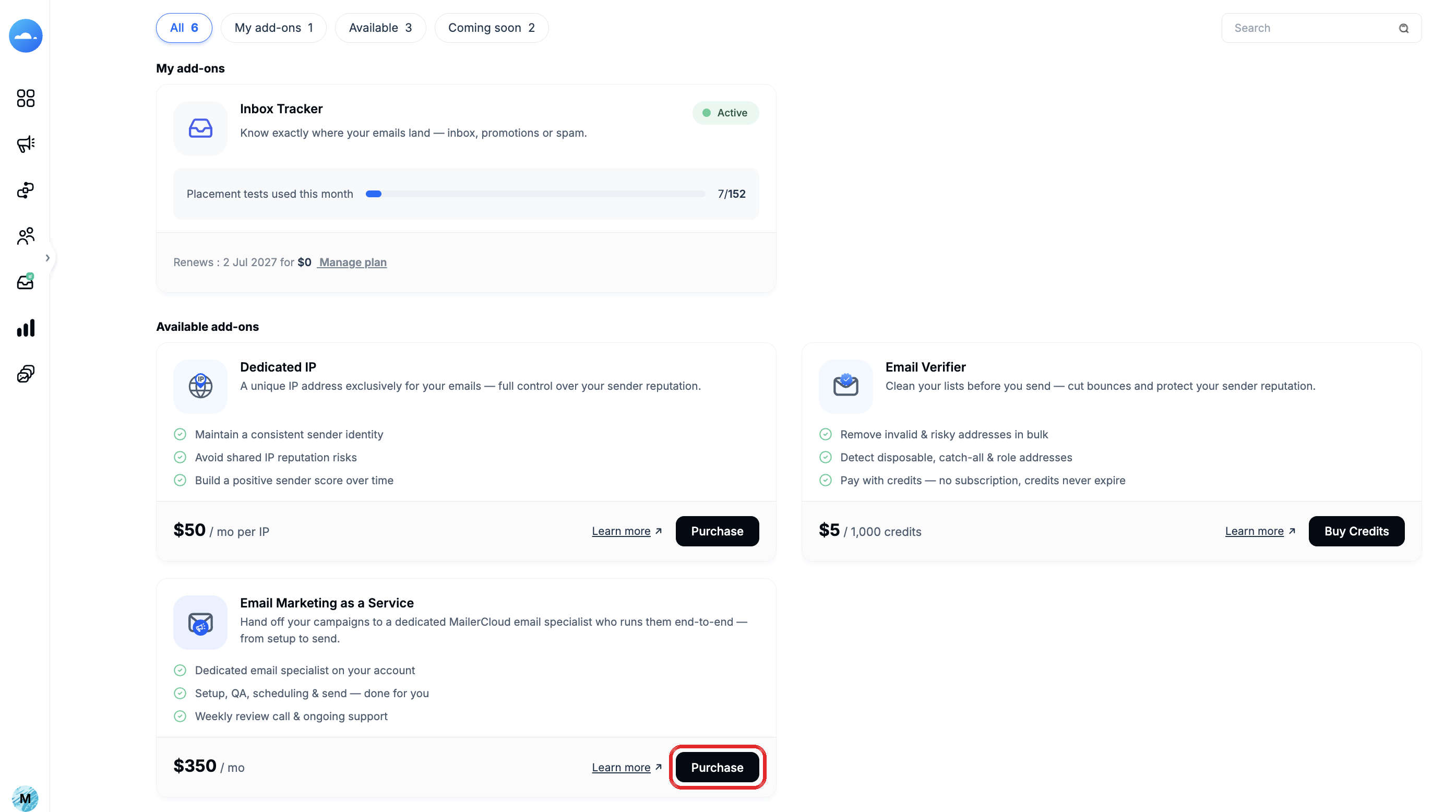
Step 1 — Log in to Mailercloud and go to Billing & Usage › Add-ons.
Step 2 — Find the Email Marketing as a Service card.
Step 3 — Review the service details, then click Purchase.
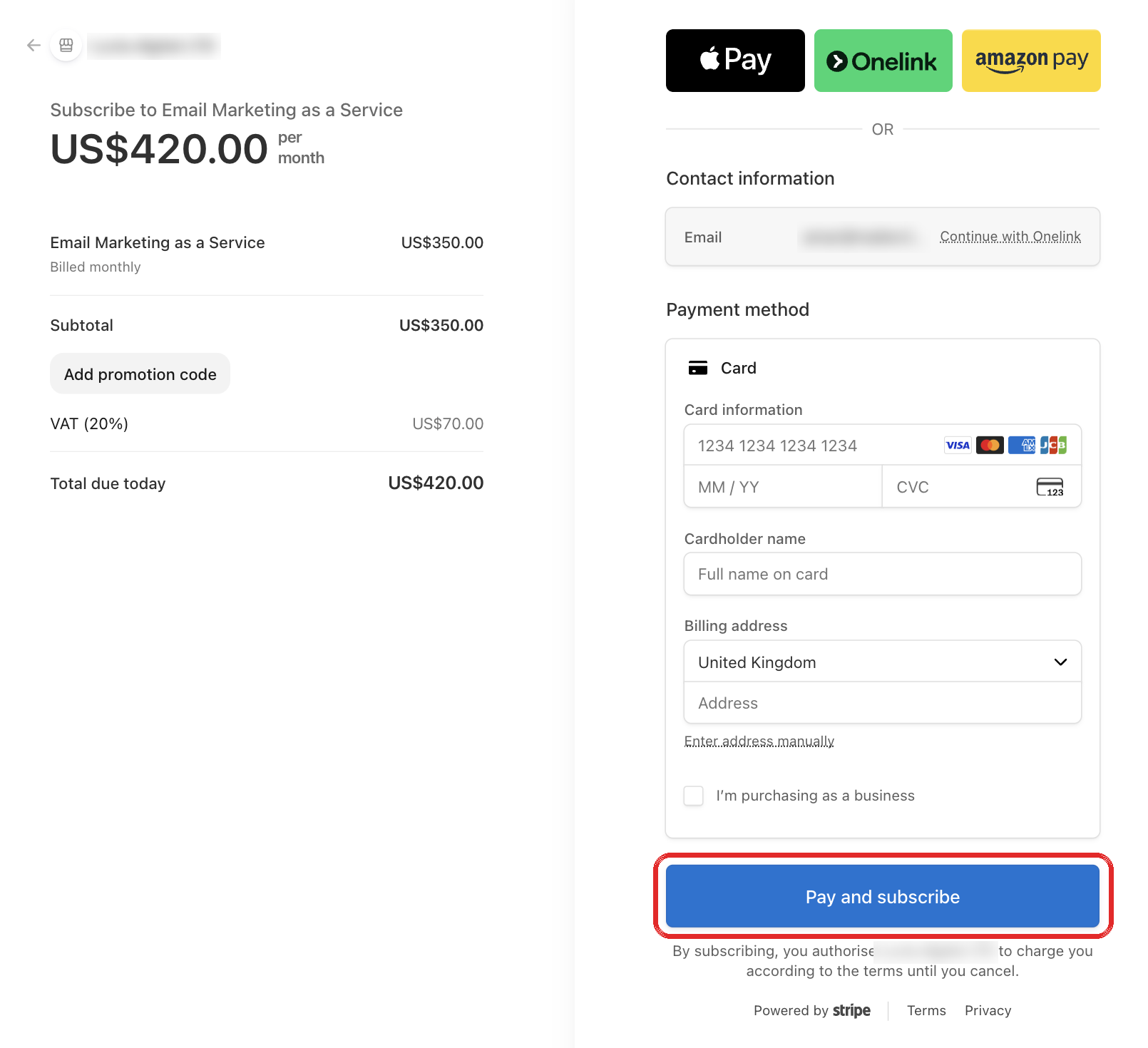
Step 4 — On the secure Stripe checkout page, choose Monthly, or switch to Yearly to save 20%.
Step 5 — Enter your payment details and confirm.
Right after payment you'll see a confirmation page, and the add-on card shows Active · Being assigned.
Here's the full sequence:
Step 1 — A welcome email arrives immediately, confirming your subscription and what to expect next.
Step 2 — Within 24 hours, your dedicated email specialist emails you directly to introduce themselves and share a link to book your kickoff call.
Step 3 — On the kickoff call, your specialist gets to know your campaigns, audience, brand and goals, and you agree on scope and priorities.
Step 4 — From there, your specialist takes over — setup, QA, scheduling and sending — and sends you a monthly report on how things are going.
All management actions live on the Email Marketing as a Service card. Click Manage to open your secure billing portal.
In the billing portal, choose the Yearly price (20% off) or switch back to Monthly. Your service continues uninterrupted — only the billing cycle changes.
From the same billing portal you can update your card and view or download invoices.
Step 1 — Click Manage on the Email Marketing as a Service card.
Step 2 — Cancel the subscription from your billing portal.
After cancelling:
Your service stays active until the end of the current billing period you've already paid for.
Your specialist sends a short handover summary of the work done, so nothing is lost.
You can re-subscribe at any time — the card returns to its purchase state and a fresh subscription starts.
How soon will someone contact me after I buy?
Within 24 hours. You'll get a welcome email immediately, and your dedicated email specialist will email you within 24 hours to introduce themselves and set up a kickoff call.
Who will be managing my campaigns?
A dedicated Mailercloud email specialist assigned to your account. They're your single point of contact and will introduce themselves by email.
Do I still have access to my account?
Yes. Your Mailercloud account works exactly as before — nothing is locked or hidden. Your specialist works alongside you, and any account access is arranged with your consent.
What does my specialist actually do?
They run your campaigns end-to-end: setup, quality checks, scheduling and sending — plus ongoing reviews and a monthly performance report. On your kickoff call you'll agree on scope and priorities.
Can I buy this on a Free plan?
Yes — Email Marketing as a Service is available on any plan, including Free.
How am I billed?
It's a recurring subscription — monthly or yearly (yearly saves 20%). Payments are handled securely by Stripe.
What happens if I cancel?
Your service stays active until the end of the billing period you've paid for, and your specialist sends a handover summary. You can re-subscribe at any time.
How do I get a report on what's been done?
Your specialist sends a monthly report covering campaigns sent, open and click performance, what was done, and what's coming next.
Not sure if Email Marketing as a Service is right for you, or have a question about your subscription? Reach out to our support team via live chat or email us at [email protected] — we're happy to walk you through how it works.
Happy emailing! 🚀